Disk Recon 14.1
Rename Files
The 'Rename Files' option is available from the file search result pane.

It allows you to rename a whole batch of files with a few clicks according to a set of rules that you can define yourself.
The starting point for 'File Rename' is the File Search tab. Here you can easily display and select the files you want to rename.
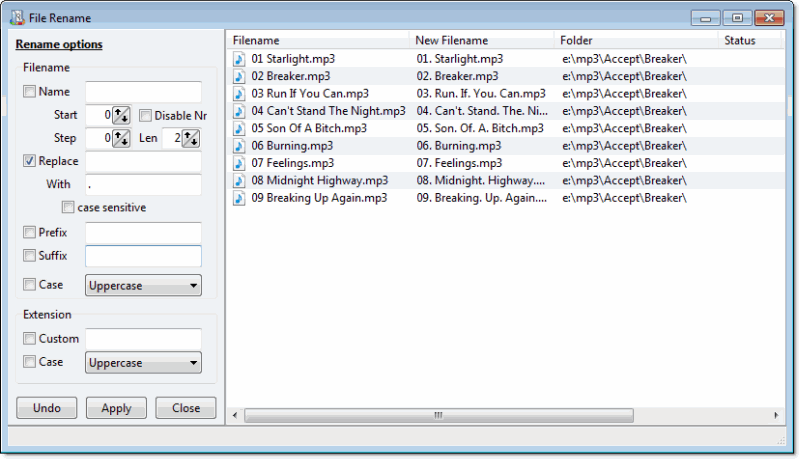
First you need to place a checkmark in front of the files that you want to work with and then press the 'Rename' button. Then a new window will be shown where you can select the settings that you want to apply to the selected files.
Renaming Rules
Enable any rule by placing a checkmark in front of it, then enter the value to apply. Multiple rules can be combined and are applied in the order listed:
- New name — Replace the entire filename with a fixed base name. Enable numbering to append an auto-incrementing number (e.g.
photo_001.jpg,photo_002.jpg, ...). - Text replacing — Find a substring in the current filename and replace it with another string. Useful for correcting a consistent typo or removing a prefix across many files.
- Prefix / Suffix — Prepend or append a fixed string to every filename (e.g. add
2026_as a prefix or_finalas a suffix). - Casing — Change the capitalisation of the filename to UPPERCASE, lowercase, or Proper Case.
- Custom extension — Replace the file extension with a different one (e.g. change
.jpegto.jpgacross hundreds of files). - Change case of extension — Normalise the extension to lowercase or uppercase independently of the filename casing rule.
You can preview the changes that you want to make by pressing the 'refresh' button. The 'New filename' column will be updated with the changes that you made on the left side.
The file names on disk are actually changed when you press the 'apply' button. In the grid on the right side you can see whether the action succeeded in the 'status' column.
If you're not happy about the results or want to revert the action you can press the 'Undo' button, which reverts the filenames back to their original name.