Disk Recon 14.1
Image Preview
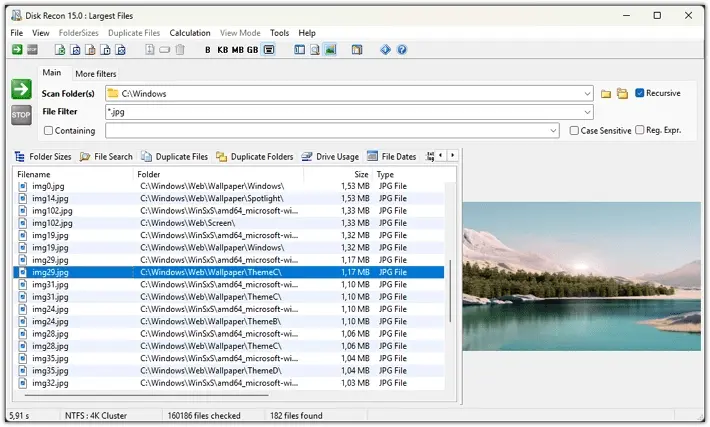
Image Preview is a panel on the right side of the result grid that instantly displays the selected file as an image. It lets you visually confirm which file you are looking at without opening an external viewer.
Toggle it on or off with Ctrl-I, the toolbar button, or the View menu.
Supported Formats
The following image types are displayed in the preview panel:
- BMP — Windows Bitmap
- JPG / JPEG — JPEG photos
- PNG — Portable Network Graphics
- WebP — raster graphics file format
- TIFF — raster graphics images
- Aviff — AV1 Image File Format
- GIF — Graphics Interchange Format (static; animation is not played)
- ICO — Windows icon files
- CUR — Windows cursor files
- ANI — Animated cursor files
- PDF — PDF documents (first page only)
SVG and RAW camera formats are not supported. If the selected file is not a supported type, the preview panel simply remains empty — no error is shown.
Resizing the Panel
Drag the left edge of the Image Preview panel left or right to give it more or less space. The image scales to fit the panel while maintaining its aspect ratio.
Available In
Image Preview is available in the following tabs:
- Folder Sizes
- File Search
- Duplicate Files
- Largest Files
- Regex Search
Copyright © 1998-2026 Blacksun Software. All Rights Reserved