Disk Recon 14.1
File Dates
The File Dates tab scans a folder and groups files by age, showing how much space is used by recently modified files versus files that have not been touched in years. It answers the question: how old is the data on my disk?
What the Report Shows
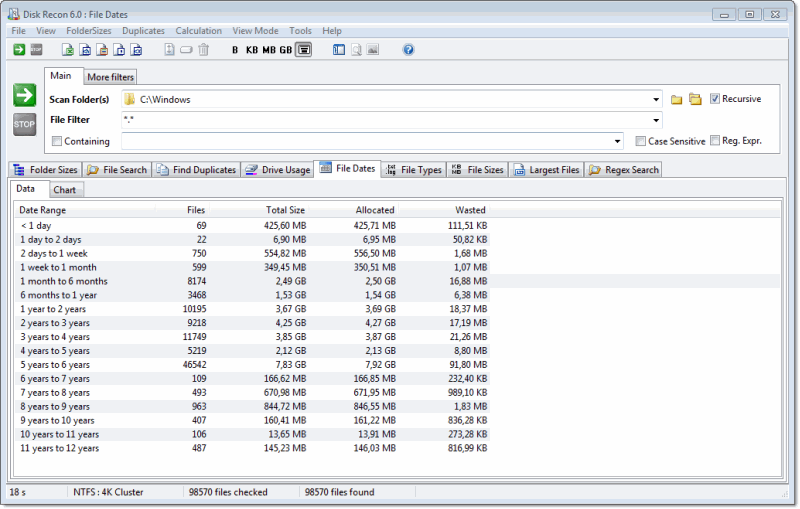
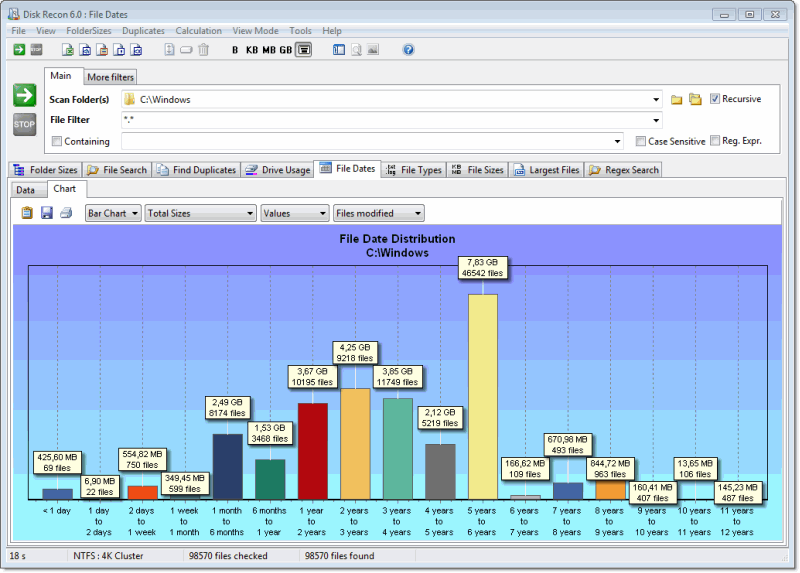
Files are grouped into age brackets (e.g. less than 1 month, 1–6 months, 6–12 months, 1–2 years, older than 2 years). For each bracket the report shows:
- Age range — the period in which files were last modified.
- Number of files — how many files were last modified within that period.
- Total size — combined size of all files in that bracket.
- Percentage — share of total scanned space those files represent.
Data and Chart Views
Switch between the raw data table and a bar chart for a visual overview. The chart makes it immediately obvious whether your storage is dominated by fresh files or years-old archives.
Typical Uses
- Identifying folders full of stale data that can safely be archived or deleted.
- Preparing a storage audit — understanding how much data has not been accessed in 2+ years.
- Checking a backup folder to verify that recent files are actually present.
Additional Info
- Reporting — Export results to MS Excel or HTML from the menu bar.
- Cancelling — Cancelling mid-scan shows results for all files processed so far.
Copyright © 1998-2026 Blacksun Software. All Rights Reserved