Disk Recon 14.1
Largest Files
The Largest Files tab scans a folder and immediately shows you the top 50 biggest files it finds. It is the fastest way to locate the single files consuming the most space on your disk — no sorting or filtering required.
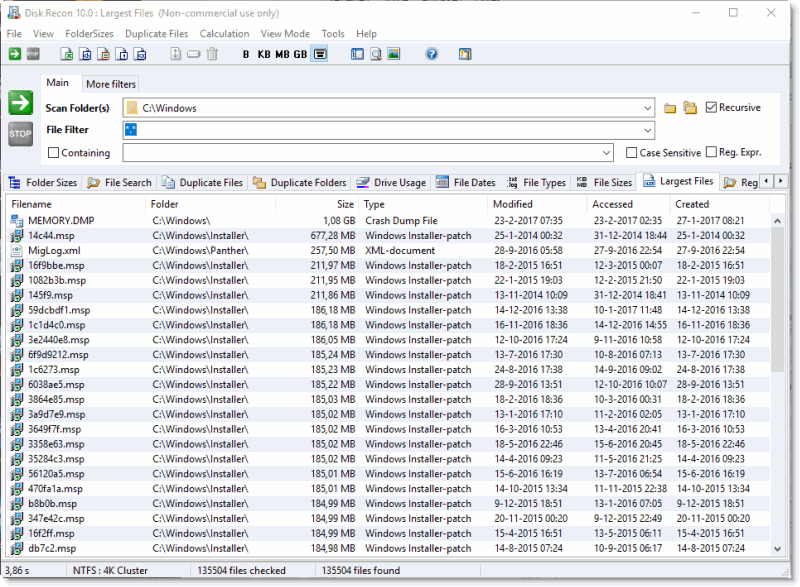
What the Report Shows
Each row shows a file and its details:
- Filename and full path — exactly where the file lives on disk.
- Size — the file's size in the current display unit (B / KB / MB / GB).
- Date modified — when the file was last changed.
The list is always sorted largest-first. The scan updates the list in real time — as Disk Recon finds a file larger than the current 50th entry, it pushes the smaller one off the list.
Typical Uses
- Quickly reclaiming space by identifying and removing forgotten large ISO, video, or backup files.
- Finding the source of unexpectedly high disk usage in a specific folder.
- Running the scan on a network share to pinpoint the biggest files across a team drive.
Additional Info
- Reporting — Export results to XLS, HTML, TXT, CSV, or XML from the menu bar.
- Cancelling — Cancelling mid-scan shows the largest 50 files found up to that point.
- Fewer than 50 files — If the scanned folder contains fewer than 50 files in total, all of them are shown rather than a truncated list.
- Tie-breaking — Files of equal size are listed in the order they were encountered during the scan, which depends on the file system's directory order.
- Right-click menu — Right-click any file to open it, explore its folder, open a Command Prompt here, or copy the full path to the clipboard.
Copyright © 1998-2026 Blacksun Software. All Rights Reserved