Disk Recon 14.1
Change File Attributes
The 'Change File Attributes' option is available from the file search result pane.

It allows you to change the file attributes (or dates) of a batch of files with only a few clicks.
First you need to place a checkmark in front of the files that you want to work with and then press the 'Attributes' button. Then a new window will be shown where you can select the settings that you want to apply to the selected files.
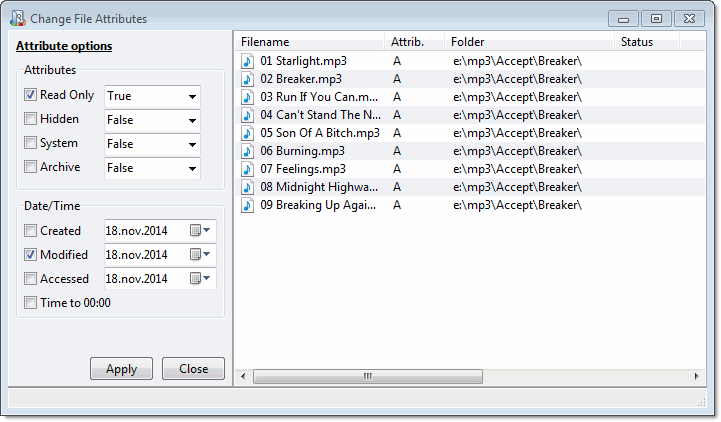
Attributes You Can Change
Enable any setting by placing a checkmark in front of it, then set the desired value:
- Read-Only (R) — Prevents the file from being modified or deleted without explicitly removing the flag. Useful for protecting reference files.
- Hidden (H) — Hides the file from normal Windows Explorer views. The file still exists on disk.
- System (S) — Marks the file as a system file. Combined with Hidden, the file is excluded from most directory listings.
- Archive (A) — Used by backup software to identify files that have changed since the last backup. Setting or clearing this flag in bulk can control which files a backup job picks up next time.
- Created date — The timestamp recorded when the file was first created.
- Modified date — The timestamp updated each time the file's contents are changed.
- Accessed date — The timestamp updated when the file is opened or read.
Changes are applied to all checked files when you press Apply. The status column in the result grid shows whether each file was updated successfully or whether a permission error occurred.
Note: Changing system file attributes (S, H, Read-Only) on files in protected Windows folders requires running Disk Recon as Administrator.