Disk Recon 14.1
File Sizes
The File Sizes tab scans a folder and groups all files into predefined size ranges, showing how many files fall into each range and the total space they occupy. It answers the question: are my files mostly tiny or mostly huge?
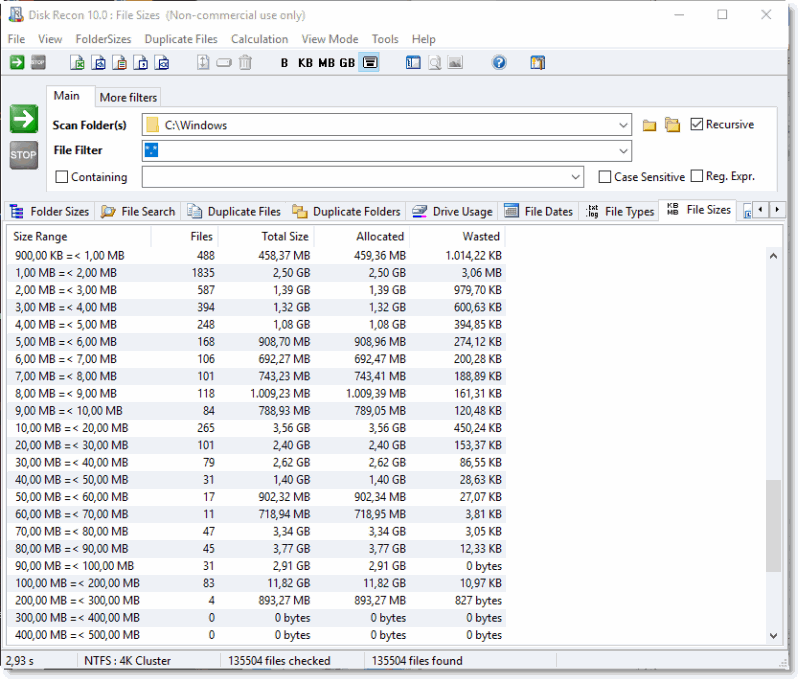
What the Report Shows
Each row in the result represents a size bracket (for example: 0–1 KB, 1–10 KB, 10–100 KB, etc.) and displays:
- Size range — the lower and upper bound of the bracket.
- Number of files — how many files fall within that range.
- Total size — the combined size of all files in that bracket.
- Percentage — what share of total scanned space those files represent.
Typical Uses
- Checking whether a folder is cluttered with thousands of tiny files that slow down backups.
- Finding large files by identifying which size brackets contain the most space.
- Understanding the storage profile of a project folder before archiving.
Additional Info
- Reporting — Export results to XLS, HTML, TXT, CSV, or XML from the menu bar.
- Cancelling — If you interrupt the scan, partial results are shown and the status bar displays "operation aborted".
Copyright © 1998-2026 Blacksun Software. All Rights Reserved