Disk Recon 14.1
Disk Usage
Disk Usage is the only module of Disk Recon that works at the disk level rather than the file level. The settings in the Control Panel have no effect here — simply click the tab and the data loads instantly. No scan required.
What Is Shown
Every drive connected to your computer is listed with the following information:
- Drive letter and label — The assigned letter (e.g. C:) and volume name.
- File system — The format of the drive (NTFS, FAT32, exFAT, etc.).
- Total capacity — The full storage capacity of the drive.
- Used space — How much space is currently occupied by files.
- Free space — How much space remains available.
- Cluster size — The allocation unit size, which determines minimum file storage overhead.
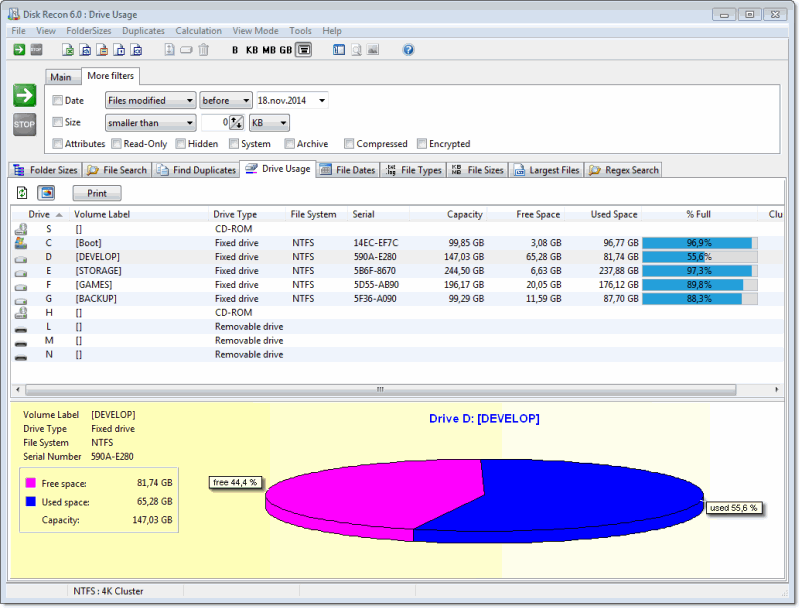
Pie Chart
Select any drive in the list to display a pie chart showing the ratio of used versus free space at a glance. The chart updates automatically when you click a different drive.
Refreshing the Data
Click the Refresh button (leftmost button in the toolbar) to reload all drive statistics. This is useful after you have deleted files or disconnected an external drive.
Copyright © 1998-2026 Blacksun Software. All Rights Reserved