Disk Recon 14.1
Harvesting (Regular Expressions)
The Harvesting feature scans the contents of files and extracts every line (or match) that satisfies a given regular expression. Unlike File Search, which tells you which files contain a pattern, Harvesting shows you the actual matching text extracted from every file — one row per match.
This is useful for pulling structured data out of large collections of log files, source code, configuration files, or documents.
How to Use It
- Select the folder(s) to scan in the Control Panel and set a file filter (e.g.
*.logor*.txt). - Go to the Regex Search tab.
- Enter your regular expression in the search box.
- Press Start. Each match is shown in the result grid together with the filename and line number.
Example Patterns
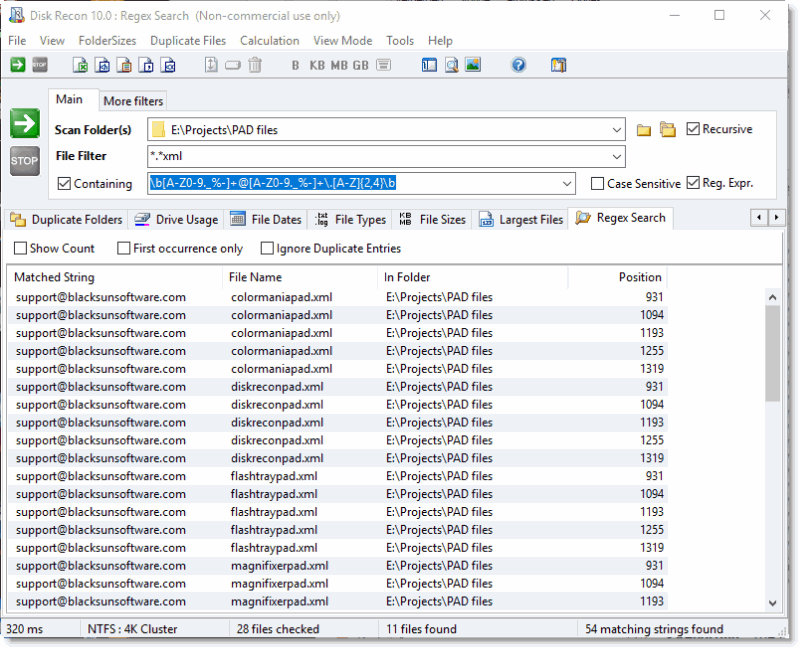
In the example below we're using a regular expression that matches any email address:
\b[A-Z0-9._%-]+@[A-Z0-9._%-]+\.[A-Z]{2,4}\b
Other useful patterns:
| Pattern | Matches |
|---|---|
\b\d{1,3}\.\d{1,3}\.\d{1,3}\.\d{1,3}\b | IPv4 addresses (e.g. 192.168.1.1) |
https?://[^\s"'<>]+ | HTTP and HTTPS URLs |
\b\d{4}-\d{2}-\d{2}\b | Dates in YYYY-MM-DD format |
ERROR[^\r\n]* | Error lines in log files |
\b[A-Z]{2,4}-\d{3,6}\b | Issue tracker IDs (e.g. JIRA-1234) |
Additional Info
- Unique matches only : Enable the "Show only unique matches" option in the Options screen to suppress repeated occurrences of the same string.
- Reporting : Results can be exported to XLS, HTML, TXT, CSV, or XML from the menu bar.
- Cancelling : Cancelling mid-scan shows results for all files processed so far — you do not lose partial results.
Copyright © 1998-2026 Blacksun Software. All Rights Reserved