Disk Recon 14.1
File Search — Advanced File Finder
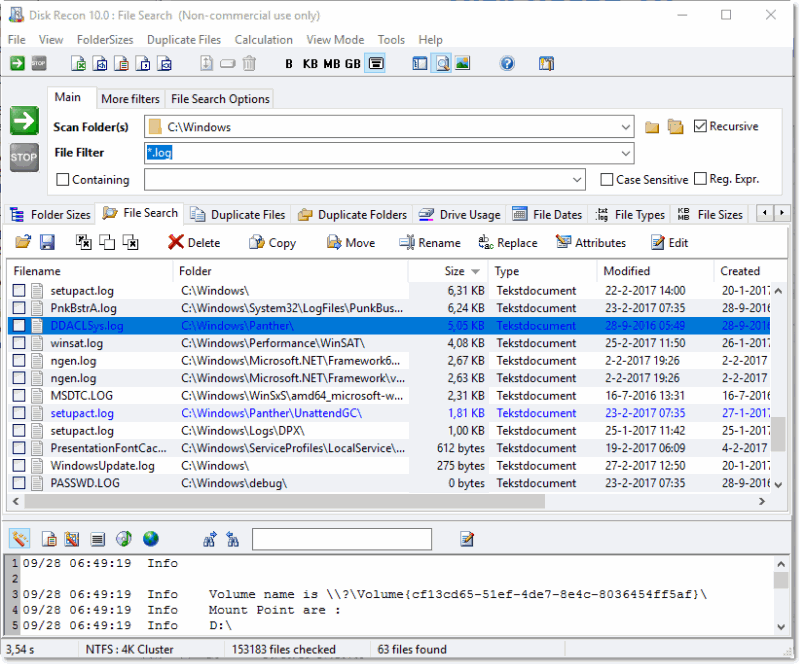
File Search is one of Disk Recon's most powerful features. It scans any folder (or multiple folders) and returns every file that matches all the criteria you set — with far more filtering options than the built-in Windows search.
Search Filters
Filters are configured in the Control Panel before you start a scan. You can combine any of the following:
- File name / wildcard — Match filenames using wildcards, e.g.
report*.docxor*.mp4;*.avifor multiple types at once. - Text content — Find files that contain a specific word or phrase. Enable case-sensitive matching if needed.
- Date range — Filter by modified, accessed, or created date. Specify an exact date, a range, or a relative period.
- File size — Find files smaller than, larger than, or between two sizes.
- File attributes — Filter by read-only, hidden, system, or archive flag.
- Subfolders — Choose whether to scan recursively or limit to the top-level folder only.
Result Grid
The result grid shows each matching file with its full path, size, dates, and attributes. Click any column header to sort. You can also:
- Switch between large icons, small icons, list, and detail view using the toolbar.
- Open a File Preview panel (Ctrl-F) to inspect file contents without opening a separate application.
- Open an Image Preview panel (Ctrl-I) to view image thumbnails for the selected file.
Acting on Results
Mark files with checkboxes and use the action panel to:
- Rename — Batch-rename with rules: prefix, suffix, number sequencing, case change, and more.
- Copy — Copy marked files to any destination folder.
- Move — Move marked files to another location.
- Archive — Compress marked files into a ZIP file.
Right-Click Context Menu
Right-clicking any file gives standard shell actions plus these Disk Recon extras:
- Explore Containing Folder — Opens File Explorer on the file's parent folder.
- Open Command Window here — Opens a Command Prompt in the file's folder.
- Set as 'Scan Folder' — Replaces the current scan folder with this file's folder.
- Copy File name to clipboard — Copies the full path and filename to the clipboard.
Reporting
Export the full result set to XLS, HTML, TXT, CSV, or XML using the export buttons in the menu bar.
Copyright © 1998-2026 Blacksun Software. All Rights Reserved