X-Fonter 14.0.3
Font Renamer
Many font files have filenames that say nothing about the font itself — a legacy of the old 8.3 filename limit. It is much easier to manage a font library when filenames match the actual font names.
The Font Renamer in X-Fonter makes this a one-click task. It handles TrueType, OpenType, and PostScript Type 1 fonts.
Using the Font Renamer
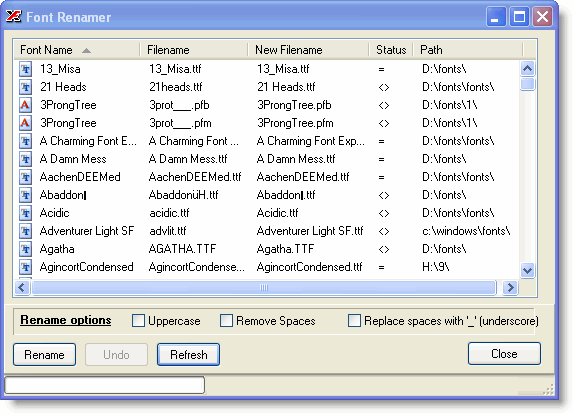
Open the Font Renamer from the Tools menu. The rename dialog lists all fonts currently shown in the font selection panel. Two columns help you review the changes before committing:
- Status — flags fonts whose filename differs from the font name
- New Filename — shows the proposed filename after renaming
Renaming Options
Three optional rules can be applied to the generated filename:
- Change all characters to uppercase
- Remove all spaces
- Replace spaces with an underscore (
_)
The New Filename and Status columns update immediately when you change any of these options. Click Rename to apply the changes.
? : * " and others) are
automatically removed from the generated filename. If you are not satisfied with
the result, click Undo to restore the original filenames.
Copyright © 2001-2026 Blacksun Software. All Rights Reserved