X-Fonter 14.0.3
Configuration Files
Working with different fonts often means working with different colors, sizes, and effects. X-Fonter lets you save all these settings to a configuration file so you can restore them at any time.
For example, you might keep one color scheme for website projects and a completely different one for print work. A configuration file per project lets you switch between setups instantly, without reconfiguring anything manually.
How to Use Configuration Files
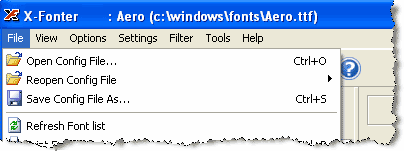
The first three items of the File menu handle loading and saving configuration files:
- Open Config File — browse for and open a previously saved configuration file
- Reopen Config File — choose from a list of recently opened configuration files
- Save Config File As — save your current settings to a new configuration file
Copyright © 2001-2026 Blacksun Software. All Rights Reserved