X-Fonter 14.0.3
Font Overview Printout
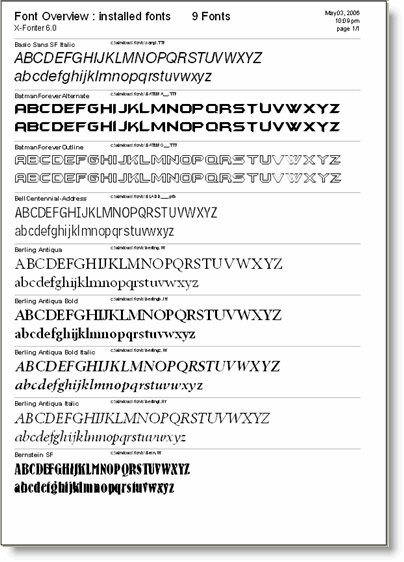
The Font Overview is the Font Listing report type. It produces a printed reference sheet where each font is displayed on its own row, showing the font name and your chosen sample text rendered in that font at the configured size. It is the fastest way to produce a physical catalogue of a font set — for your own reference, to share with a client, or to keep alongside a font archive.
What the Report Contains
Each font in the report occupies one or more rows depending on how many sample text lines you configured in the print dialog. For each font the report shows:
- Font name — the internal name of the font as stored in the font file
- Sample text lines — up to three lines of text rendered in that font at the chosen print size. Empty lines are omitted, so if you only filled in one line in the print dialog, each font occupies a single compact row
- Font file name (optional) — the filename on disk, shown if you enabled the Print Font File Name option in the print dialog. Useful for cross-referencing a printout with files in Windows Explorer or a font archive
The report is sorted in the same order as the font list in the tab you were viewing when you opened the print dialog — typically alphabetical by font name.
How Many Fonts Fit Per Page
The number of fonts per page depends on three factors: the print size you chose, how many sample text lines you filled in, and whether font file names are included. As a rough guide:
- A small print size with one sample line and no file names fits the most fonts per page — suitable for cataloguing a large library where you just need to see the typeface at a glance
- A larger print size with three sample lines and file names included produces fewer fonts per page but is easier to read and more informative as a hand-off document for a client or colleague
The page count indicator in the print dialog updates automatically as you change these settings, so you can find the right balance before committing to print.
Producing This Report
The Font Overview report is produced by selecting Font Listing as the report type in the print dialog. For full instructions on configuring and printing it, see Printing Fonts. To check the layout before printing, use Print Preview.
Related Topics
- Printing Fonts — how to configure the print dialog and launch a print job
- Print Preview — check the layout before sending to the printer
- Character Map Printout — the other available report type, showing each font's full character grid
Copyright © 2001-2026 Blacksun Software. All Rights Reserved