Texefex 5.0
Text Coloring
Text Coloring allows you to apply color effects on the text that you provide in the Input/Output screen. There are three types of color effects and each of them is described below.
1. Rainbow Colors
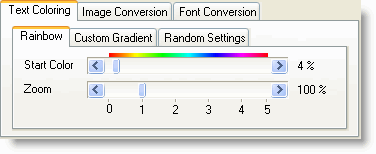
This mode applies a rainbow effect on your text. There are two parameters that you can change:
- Start Color — defines the starting color of your effect.
- Zoom Factor — defines how many times the rainbow should be cycled (if you set the zoom factor lower than 1, only a part of the rainbow cycle is used — this is the setting used most of the time).
2. Custom Gradients
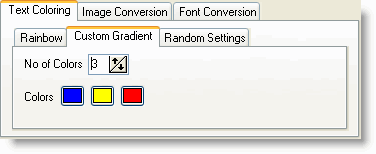
Here you can define from 2 up to 8 custom colors through which the program will cycle, creating gradient colors between them.
You can simply type in the number of colors you want to use, or press the up/down buttons to increase/decrease the current number. When you change this number, the same amount of buttons will appear below.
You can change the color of these buttons by clicking on them. Depending on whether the extended color picker is enabled in the options menu, you will get the standard color dialog or the extended ColorMania color picker dialog where you can select the colors you want.
3. Random
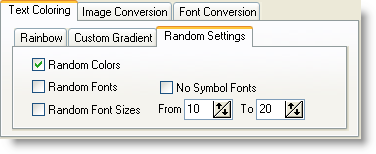
Instead of color calculation you can also create random effects:
- Random Colors — every character will get a different color.
- Random Fonts — every character will get a different font name. There's an option to exclude symbol fonts from being chosen because these fonts usually make your text unreadable.
- Random Font Sizes — every character will get a different size. You need to define a lower and upper limit for font size (default 10 and 20).
Each of these random types can be applied together. You can have multiple checkboxes checked at the same time.
Copyright © 2001-2026 Blacksun Software. All Rights Reserved