Texefex 5.0
Font Conversion
The Font Conversion module allows you to create a number of text lines that depict the text entered rendered in the specified font.
Control Panel
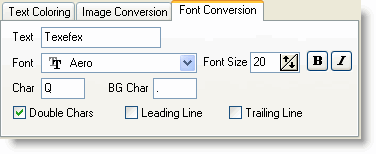
Steps to Convert a Font to Text
- Type the text you want in the control panel.
- Select the font name, font size and attributes (Bold or Italic).
- Select the foreground and background character.
- Set the extra options you want.
- Press "Generate" button or F5.
Texefex will now generate your colored text. You can always make changes to the settings you made and regenerate the colored text.
Selecting Fore and Background Colors
The easiest way to convert is simply by selecting two different fore and background characters, but you can even add more characters to get a more gradient difference.
Extra Options
- Double chars — simply converting a font into characters often doesn't look optimal because characters are usually higher than they are wide. This difference can be compensated for by using this "double characters" feature.
- The result of a font conversion often looks better when a leading and trailing line of the background character is added.
Copyright © 2001-2026 Blacksun Software. All Rights Reserved