Texefex 5.0
Control Panel
This control panel allows you to define how the colors will be applied to the text that you typed in the Input/Output panel.
Generate Button
This button (or shortcut F5) will generate the output based on the settings in the control panel.
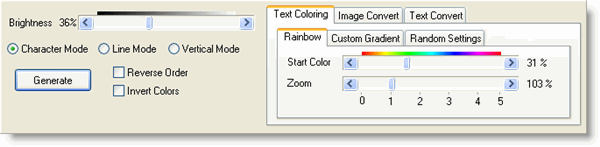
Brightness
In the upper left corner you can adjust the brightness of the output. The scrollbar ranges from 0 to 100, where the middle (50) means there is no extra adjustment. Lower values mean darker colors and higher values mean lighter colors.
Depending on the background color it is often necessary to adjust the output brightness to improve the readability of your text.
Coloring Mode
There are three different coloring modes:
- Character Mode — each character gets its own color.
- Line Mode — each line gets its own color, but all characters on that line share it. If there are a lot of lines, this setting is recommended because the result looks good and the output code is much smaller than in Character Mode.
- Vertical Mode — colors are calculated from left to right on each line (the other modes go from top-left to bottom-right).
Reverse Order
When this checkbox is checked, the colors are calculated in reverse — e.g. red-to-blue becomes blue-to-red.
Invert Colors
When this checkbox is checked, inverted colors are calculated.
Effect Modes
There are three effect modes, each described in detail in a separate section of this help file:
Copyright © 2001-2026 Blacksun Software. All Rights Reserved