Texefex 5.0
HTML Output
Output in Texefex is created in RTF, but there's also an option to convert it to HTML so that you can use it for websites or any other medium that uses HTML.
The resulting HTML code is shown in the second tab of the Input/Output panel. You can copy this code to the clipboard or save it to an HTML file.
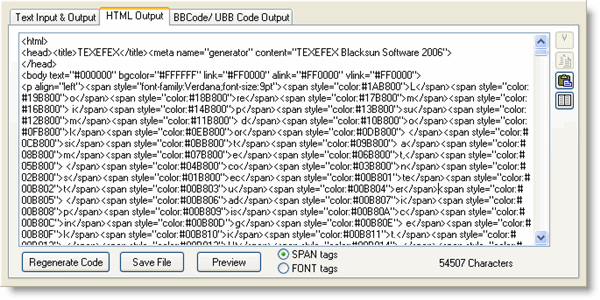
- Regenerate Code — if the HTML code is not automatically generated (see menu settings), you can still manually perform this function by pressing this button.
- Save File — saves the HTML code to a file (save file dialog).
- Preview — opens a new window with a preview of how the HTML code looks in a web browser.
In the menu you have the option to create the HTML code automatically each time Texefex starts processing a job, but this usually makes the processing time longer. If you do not want this HTML code to be created each time, you can turn this option off and push the "Regenerate" button manually.
The font color tags in the HTML code can be generated by using either the SPAN tag or the FONT tag. You have the option to choose between those two.
You're allowed to change the HTML code in whatever way you want.
The size of the HTML output is also shown at the bottom of the screen. When color tags are generated for each character this can potentially create very large output files and this could have a big impact on the bandwidth of your website.
Copyright © 2001-2026 Blacksun Software. All Rights Reserved