ColorMania 15.1
Screen Magnifier and Color Grabber
ColorMania allows you to grab any color from your desktop or any application running on it. On high-resolution screens it can be almost impossible to select exactly the right pixel, so ColorMania includes a screen magnifier that shows your mouse cursor area magnified up to 20 times.
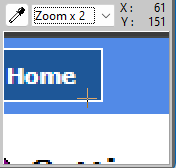
Grabbing a Color
To grab a color from your screen, press and hold the eyedropper button and drag the cursor to the area you want to sample. The magnifier will continuously show a magnified version of the area around the cursor, making it easy to select exactly the right pixel.
When you release the mouse button the magnifier contents will no longer be updated, but you can still select any color from the magnified area by clicking on it.
Changing the Magnification Level
There are three ways to change the magnification level:
- Use the zoom dropdown next to the eyedropper to select a level between 1 and 20
- Use Shift-F1 through Shift-F10 to quickly set a level between 1 and 10
- Right-click the ColorMania window and select the wanted level from the Zoom submenu
Color Averaging
When it is difficult to select a single pixel color that accurately represents an area of the image, ColorMania can calculate the average color from a small pixel area around the cursor. This can be configured from the popup menu using the following options:
- Pixel Level — uses the exact color of the selected pixel
- 3×3 Average — calculates the average color of a 3×3 pixel area
- 5×5 Average — calculates the average color of a 5×5 pixel area
When 3×3 or 5×5 averaging is active, this is indicated by a small icon on the eyedropper button.
Screen Coordinates
While moving the eyedropper, the current screen coordinates of the cursor are shown in the ColorMania window. This can be useful for measuring distances between two points on screen:
- Press Ctrl-Alt-C to set the origin point (0,0) to the current cursor position — all coordinates shown will then be relative to this point
- Press Ctrl-Alt-X to reset the coordinates back to absolute screen coordinates
Crosshair Display
The magnifier can display a crosshair over the selected pixel to help with precise selection. There are three crosshair options, which can be selected from the Crosshair submenu when you right-click the ColorMania window:
- Cross — displays a traditional crosshair over the selected pixel
- Rectangle — draws a rectangle around the selected pixel
- No display — hides the crosshair entirely
Copyright © 2001-2026 Blacksun Software. All Rights Reserved