ColorMania 15.1
HTML colors and other named colors
ColorMania has two lists of predefined named colors that you can use to make working with colors easier.
- The first list contains the 140 standard HTML colors. These color names can be used directly in HTML or CSS.
- The second list is a full extended list of over 1,560 named colors sourced from Wikipedia.
The color list dropdown displays the names of the colors in alphabetical order by default, and also shows a small color sample next to each name so you can see what the color looks like at a glance.
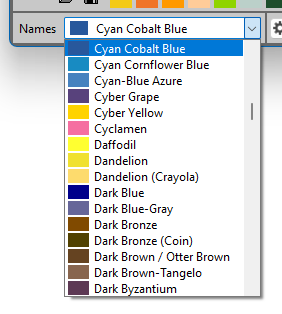
Switching Between the Two Color Lists
By default the full list of 1,560 named colors is used. To switch to the smaller HTML-only list, right-click the color dropdown and select Show only HTML Colors. This is useful when you specifically need standard HTML and CSS color names.
Sorting the Color List
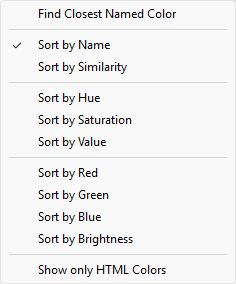
Right-clicking the color dropdown opens a popup menu that lets you change the sort order of the colors.
The following sort options are available:
- By Name — alphabetical order
- By Similarity — sorted by how close each color is to the currently selected color, making it easy to find similar shades
- By Hue — grouped by color family
- By Saturation — from grey to fully vivid
- By Value — from dark to light
- By Red — sorted by Red component value
- By Green — sorted by Green component value
- By Blue — sorted by Blue component value
- By Brightness — sorted by overall perceived brightness
Finding the Closest Named Color
Right-clicking the color dropdown and selecting Find Closest Named Color will automatically find and select the named color that most closely matches the currently active color. This is useful when you have a color code and want to know its nearest named equivalent.
Selecting a Color from the List
To select a color, open the dropdown and click on the color name. The selected color will become the active color in ColorMania and all values will update automatically.
Automatic Color Name Detection
Whenever the current color in ColorMania exactly matches one of the named colors, its name is automatically shown in the color dropdown. This means that if you are working with a color that happens to be one of the predefined named colors, you will see its name displayed without having to search for it manually.
Copyright © 2001-2026 Blacksun Software. All Rights Reserved