ColorMania 15.1
RGB and HSV Sliders
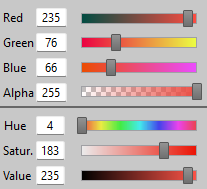
Colors can be described using different color spaces. ColorMania supports RGB and HSV as its primary slider controls, alongside other formats such as CMY, CMYK and HSL. Each color space defines a color using a set of coordinates — the sliders in this section let you view and adjust the RGB and HSV values for the currently selected color.
RGB Color Space
RGB uses three components — Red, Green and Blue — each ranging from 0 to 255. Combining these three values in different amounts produces any color. A value of 0 means none of that component is present, while 255 means it is at full intensity. For example, R:255 G:0 B:0 produces pure red, while R:255 G:255 B:255 produces white.
HSV Color Space
HSV describes colors using three different properties:
- Hue (0–360°) — the angle around the color wheel, representing the base color
- Saturation (0–255) — the vividness of the color, from grey to fully saturated
- Value (0–255) — the brightness of the color, from black to full brightness
HSV is often more intuitive than RGB when making subtle adjustments to a color, as each property has a clear visual meaning.
Gradient Strips
Each slider displays a gradient strip along its track, showing how adjusting that property would affect the current color. These gradients update automatically as you change any value, always reflecting the effect of moving that specific slider from its minimum to maximum position.
Changing a Value
There are three ways to change a slider value:
- Move the slider left or right by clicking and dragging
- Type a value directly into the input field to the left of the slider
- Hover over a slider and use the mouse scroll wheel to increment the value one step at a time
RGB and HSV are different ways of describing the same color — any change made using one set of sliders is automatically reflected in the other.
The Alpha Channel
The Alpha channel controls the transparency of the selected color. It ranges from 0 (fully transparent) to 255 (fully opaque). The Alpha slider is displayed with a checkerboard pattern, which is the conventional way to represent transparency. The Alpha value is included in color formats that support transparency, such as CSS RGBA and Android color codes.
Copyright © 2001-2026 Blacksun Software. All Rights Reserved