ColorMania 15.1
Color Palette
The Color Palette is a storage place for colors. Each palette can hold 16 colors, allowing you to build up a collection of colors for your project. If a project requires more than 16 colors, you can use more than one palette file.

Saving and Loading a Palette
Palette files have a .PLT extension and can be saved to and loaded from your hard disk, making it easy to reuse color collections across different projects.
- To save a palette, press the Save button and give your palette file a descriptive name.
- To load a palette, press the Load button and select a palette file from your disk.
Palette Name and Unsaved Changes
When a palette is loaded or saved, the palette name is displayed in the palette area. You can hover over the name to see the full file name and path.
Whenever a palette has unsaved changes, a checkmark will appear next to the palette name as a reminder that the palette needs to be saved.
Saving a Color to the Palette
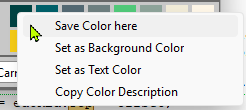
To save the current color to a specific slot in the palette, right-click on the slot and select Save Color here from the context menu.
Selecting a Color from the Palette
To select a color from the palette, simply click on the palette slot. The selected color will become the active color in ColorMania.
Context Menu Options
Right-clicking any palette slot gives you the following options:
- Save Color here — saves the current active color to this slot
- Set as Active Color — makes this palette color the current working color
- Set as Text Color — sets this palette color as the text color in the color display area
- Copy Color Description — copies the color code of this palette slot to the clipboard without selecting it as the active color
Copyright © 2001-2026 Blacksun Software. All Rights Reserved