Mousotron 15.0
Mousotron Setup
By pressing the 'setup' button on the main Mousotron Pro screen, or selecting 'setup' from the popup window, a setup screen is displayed containing several tabs:
General Tab
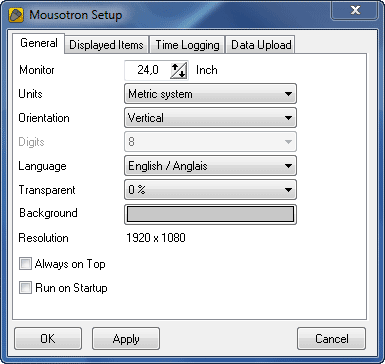
Here you can modify the following items:
- Monitor size: This setting is used to calculate the distance the mouse cursor travels, so it is important to set it right.
- Distance Unit: Select whether you want to display the distance using the English or the Metric system.
- English system: Miles + Yards + Inches
- Metric System: Kilometers + Meters + Centimeters
- Orientation: If you want to display more than one measured item, you can choose here to display them in a horizontal or vertical way.
- Digits: When the Orientation setting is 'Horizontal', you can modify the number of digits on your display. This is useful for smaller screen resolutions. In vertical mode, the number of digits is always 10.
- Language: Select the language for all displays and dialogs. Supported languages include:
- English / Anglais
- Dutch / Nederlands
- German / Deutsch
- Spanish / Español
- French / Français
- Swedish / Svenska
- Norwegian / Norge
- Portuguese / Português
- Czech / čeština
- Transparent: Transparency works on Win 2000 and higher. Values higher than 0 make the main form transparent.
- Background Color: Lets you choose the background color of your display
- Idle Time Delay: Determines after how many seconds the idle timer begins to count.
- Always on Top: Keeps Mousotron Pro visible over other programs.
- Run On Startup: Automatically starts Mousotron when Windows starts.
- Hide Screen on Startup: Starts Mousotron in background mode.
Displayed Items Tab

Select the items you want to display:
- Cursor distance
- Keystrokes
- Left Button Clicks
- Right Button Clicks
- Middle Button Clicks
- Double Clicks (for any mouse button)
- MouseWheel Scrolls
- Cursor Speed
- X Coordinate (horizontal)
- Y Coordinate (vertical)
Note: Statistics are still measured even if an item is deselected here.
Time Display Tab

- Show only running: Displays time Mousotron has actually been running (since last reset or last start).
- Show total time: Displays difference between last reset and current date.
- Log every day: Saves measurements daily to 'mousotron.log' in the program directory.
Internet Logging

- Alias: Your name for online details.
- Comment: Any comment/URL to leave on the website.
- URL: The destination for posted data.
- Send Now button: Immediately posts data to the web.
- View Page button: Opens a browser to see Mousotron data.
- Enable Internet Logging: Sets the interval for automatic updates.
Remark: Mousotron uses Internet Explorer Connection Settings for online posting.
Copyright © 2001-2026 Blacksun Software. All Rights Reserved