
Mousotron — Mouse & Keyboard Activity Tracker for Windows
Count Clicks, Keystrokes and Mouse Distance — Track How You Use Your Computer
How many miles does your mouse cursor travel each day? How many clicks did you do? Mousotron is like an odometer for your mouse — it tracks every move, click, scroll and keystroke, and lets you compare your scores with users around the world.

It can also serve as a practical ergonomics and RSI prevention tool, giving you real data on your daily computer usage patterns.
Mousotron is free. If it saves you time, a small donation helps keep it going.
Donate via PayPalTrack exact distance traveled in km/miles, every click (left, right, middle), double-clicks, and scroll wheel movements.
Count every keystroke across all applications — gaming, office work, browsing — even when Mousotron is minimised to the tray.
Upload your scores and compare your mileage with users around the world. No personal data is ever sent — only counter values.
Mousotron calculates exactly how far your mouse cursor has traveled on screen and how many times the buttons were clicked. It runs silently in the system tray using very little resources — you'll hardly notice it's there.
It works regardless of which programs you're using, including games. You can configure it to display results on top of all other windows if you want to keep an eye on your stats in real time.
Upload your counters and see how your mileage stacks up against users worldwide. It's even more fun to compete with friends or co-workers.
View Online Results →System-Wide Hooks
When Mousotron runs it installs a system-wide mouse and keyboard hook so it receives all messages sent by these devices and interprets them to keep the scores accurate. (Some additional calculation is needed for distance.)
Display Options
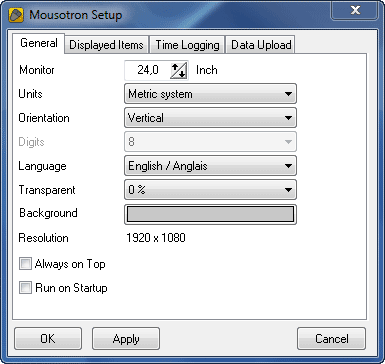
You can configure which statistics to display on screen. The distance is shown in the metric system (km, m, cm) or the English system (yards, feet, inches). Counters can be arranged horizontally or vertically, and a stay-on-top mode keeps them visible over other windows.
Multi-Language Support
Mousotron supports all major languages including English, French, German, Dutch, Spanish, Portuguese, Swedish, and Norwegian.
For commercial & business use. Supports ongoing development and gives your organisation a fully licensed deployment.
Buy Pro License via PayPal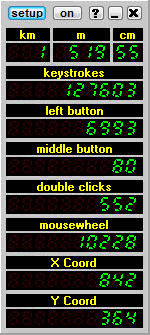
If you have PHP programming skills you can create your own system to track and display Mousotron results. Full score submission documentation is available.
Mousotron has been used in charity events such as the LOGICA Sourithon Challenge 2009, where mouse mileage translated into donations for good causes. Custom dedicated result pages were created for the event.
- Distance traveled (metric & imperial)
- Left, right, middle button clicks
- Double clicks
- XButton 1 & 2 with double clicks
- Mousewheel scroll count
- X and Y coordinates
- Cursor speed
- Number of keystrokes
- Idle time counter
- Configurable counter display
- Horizontal or vertical alignment
- Stay-on-top option
- Animated background (toggle)
- System tray operation
- Starts minimised option
- Runs on startup
- Multi-language support
- Saves distance history
- Time logging in multiple modes
- Data import / export
- Upload scores online
- Works with all mice and keyboards
- Works with all monitor sizes
- Larger monitor sizes (14.0+)
- All Windows versions
- Works across all applications
- Works while gaming
- Minimal resource usage
- Easy setup
- Startup improved
- Tray icon hint updated
- Bugs fixed
- Data upload modernised (Windows security fix)
- Larger monitor sizes now supported
- File location fixed
- Double clicks added for XButton 1 & 2
- Hook initialisation changed
- Debug info added
- Old components removed (RX)
- Error 103 bug fixed again
- Error 103 bug fixed
- Mouse buttons 4 & 5 added (XButtons)
- Data import/export added to transfer counter values
- Idle time counter added
- Option to start minimised
- Major development environment upgrade
- Better theme support and small layout improvements
- X and Y coordinates added
- System-wide hook improved
- Layout and logging improvements
- System-wide hooks rewritten for stability
- Several improvements for smoother operation
- Distances over 100 km/miles now displayed correctly
- Check for upgrade added
- Mousotron now tray-icon-only (no taskbar button)
- Double-click tray icon to show/hide counters
- Windows 7 compatibility fix