FlashTray Pro 5.0
Highlighter Configuration
Configuration of FlashTray is done by selecting 'Configure' from the popup menu. This will show the configure screen with three tabs.
General
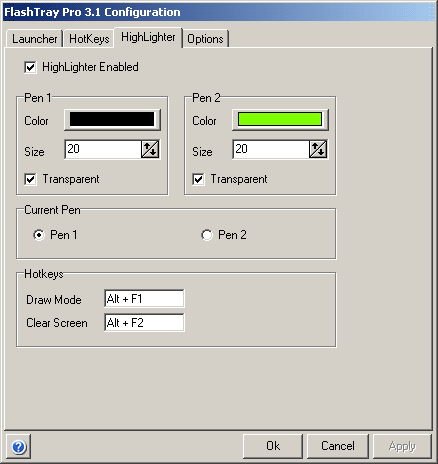
The highlighter in FlashTray (Pro) lets you define two pens with which you can draw anywhere on your screen by using a predefined set of hotkeys. This is especially useful when showing a presentation.
Configuration
For each of the two pens you can define the following properties:
- Color
- Size
- Transparency
Immediately below these properties you can select which pen you want to be active. You can also make a hotkey with the PENSWITCH keyword, which will automatically switch between the two pens without having to go to the configuration window.
In FlashTray Pro you have the option to set the highlighter to 'Horizontal Mode' where you can only draw horizontal lines. This comes in very handy when you only want to highlight parts of a text (or have an unsteady hand :-).
Saving Changes
The three buttons at the bottom of the screen are used to apply or discard the changes that are made to all the FlashTray configuration items (Launcher, Hotkeys and Options).
- The OK button will apply all the modifications and write them to disk. The configuration screen will also be closed.
- The Cancel button will discard all the changes that are made since you called the configuration screen (or since you last applied any changes).
- The Apply button will apply all the changes, but keep the configuration screen open. This button will only be enabled when configuration changes have been made.
Copyright © 2001-2026 Blacksun Software. All Rights Reserved